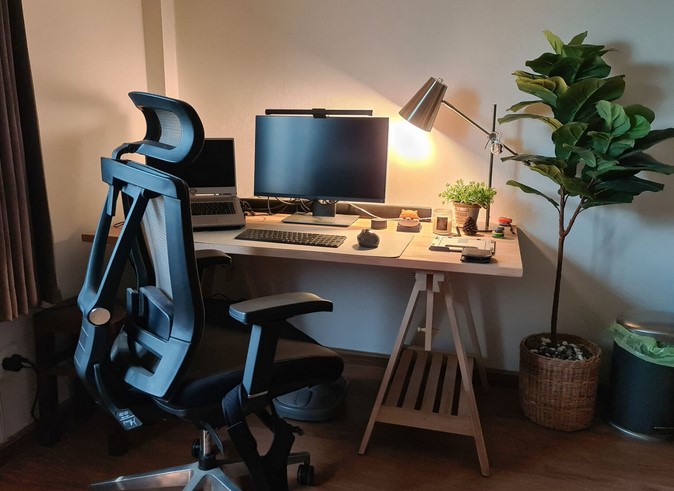
You’ve been hunched over your latest project for three hours, and the familiar, dull throb in your lower back has officially migrated to your neck. You try to stretch, but your workspace is locked at a height that was apparently designed for someone six inches shorter—or taller—than you. It’s a silent productivity killer that affects 80% of desk-bound workers and hobbyists alike: the “Static Station Slump.”
In my ten years of building custom workshops and optimizing home offices, I’ve seen countless people invest thousands in high-end tools or computers, only to place them on a rigid, bargain-bin desk. I’ve personally suffered through the “fixed-height blues” until I switched my primary shop bench to an Adjustable Work Table. The transformation wasn’t just physical; my output increased because my environment finally stopped fighting my anatomy.
The Physics of the Pivot: Why Static is Status Quo (and Bad)
To understand why an Adjustable Work Table is a game-changer, we have to look at the biomechanics of labor. Human beings aren’t statues; we are dynamic movers. When you stay in one position for too long, your muscles experience “static loading,” which restricts blood flow and leads to rapid fatigue.
Think of your workspace like a pair of shoes. You wouldn’t wear a size 9 if you’re a size 11 just because it was the “standard” available, right? A fixed desk is a one-size-fits-all solution in a world of unique body types. By utilizing a table that scales with your tasks, you are essentially “tailoring” your furniture to your skeletal alignment.
In the pro world, we call this Ergonomic Operational Scaling. It’s the ability to shift your environment to match the specific demands of the minute—whether that’s precision assembly at chest height or heavy-duty sanding at hip level.
Technical Deep-Dive: Mechanical vs. Electric Systems
When you start looking for an Adjustable Work Table, you’ll find two primary “engines” under the hood. Choosing the right one depends on your workflow and the weight of your gear.
1. Manual Crank Systems
These are the old-school workhorses. They use a worm gear or a chain drive connected to a hand crank.
-
Pros: They don’t require a power outlet, they are incredibly durable, and they usually have a higher weight capacity.
-
Cons: They take effort. If you need to change heights ten times a day, your arm is going to get a workout.
2. Electric Dual-Motor Systems
These are the modern standard for home offices and light labs. They use synchronized motors in each leg to lift the surface at the touch of a button.
-
Pros: Precision height presets and ease of use. You can jump from sitting to standing in roughly 10 seconds.
-
Cons: They are limited by “lift capacity” (usually 150–350 lbs) and require cable management for the power cord.
Precision Alignment: Finding Your “Golden Heights”
For the intermediate user, owning an Adjustable Work Table is only half the battle; the other half is knowing how to calibrate it. Most people set their table too high, causing their shoulders to shrug and creating tension in the trapezius muscles.
The Professional Alignment Checklist:
-
Seated Height: Your elbows should be at a 90-degree angle, with your forearms resting parallel to the table surface. Your feet must be flat on the floor.
-
Standing Height: The table should hit just below your elbow height. This allows you to work without leaning forward or overextending your wrists.
-
The Eye-Level Rule: If you are using a monitor, the top third of the screen should be at eye level. This is why many pro-grade Adjustable Work Table setups include an integrated monitor arm to maintain this ratio regardless of table height.
Material Matters: Load Capacity and Surface Durability
In my years of practical experience, I’ve seen “office” adjustable desks collapse because someone tried to use them as a woodworking bench. You must match the top material and frame gauge to your specific niche.
-
For Home Offices: A high-pressure laminate or bamboo top is sufficient. It’s light, easy to clean, and handles the weight of dual monitors easily.
-
For Workshops/DIY: You need a solid butcher block or a steel-reinforced surface. These tops can handle the vibration of power tools and the clamping force required for heavy assembly.
-
Frame Stability: Look for a “T-Style” or “C-Style” leg frame. High-end Adjustable Work Table units use heavy-gauge cold-rolled steel to prevent “wobble” when the table is at its highest extension.
Tips Pro: The Hidden Warning
Beware of “single-motor” electric desks if you have an uneven load. If you place a heavy 3D printer on one side and nothing on the other, a single-motor hex-rod system can bind or tilt over time, eventually burning out the motor. For long-term reliability, always opt for a Dual-Motor system with an anti-collision sensor.
Cable Management: The Secret to Operational Scaling
The biggest “rookie mistake” with an Adjustable Work Table is forgetting the cables. If you have a desktop PC on the floor and your monitors on the table, a sudden rise to standing height can rip the cords right out of your ports.
How to “Scale” Your Cables:
-
The Snake Method: Use a flexible cable spine that expands and contracts as the table moves.
-
The Under-Mount Power Strip: Bolt a surge protector directly to the underside of the table. This way, only one main power cord needs to travel to the wall outlet.
-
Slack Allowance: Always leave a “drip loop” of extra cord length to ensure the motors never meet resistance from a tight wire.
Enhancing Productivity: The Standing Interval Strategy
Buying the table is an investment in your health, but using it correctly is an investment in your output. I recommend the 20:8:2 Rule to my clients:
-
20 Minutes sitting in a neutral posture.
-
8 Minutes standing at your Adjustable Work Table.
-
2 Minutes moving or stretching.
This cycle keeps the metabolic rate higher and prevents the brain-fog that often sets in during long sedentary afternoons. When your body feels engaged, your focus follows suit.
An Adjustable Work Table isn’t just a piece of furniture; it’s a piece of performance hardware. Whether you’re a hobbyist soldering circuit boards or a professional managing a remote team, the ability to scale your environment to your physical needs is the ultimate “life hack” for long-term health and efficiency.
Don’t let a static desk dictate your energy levels. Take control of your vertical space and feel the difference that ergonomic freedom makes.
Is your current workspace holding you back? I’d love to hear about your setup—are you a dedicated “stander,” or are you looking to make the switch from a fixed desk? Drop a comment below or ask a question about which frame capacity is right for your project. I’m here to help you build a workspace that actually works for you!
